Category: Geekdom

New York Times Serves Up Malware

Some folks who visited the NYT’s web site over the weekend were greeted with a warning that their system was infected with all sorts of crap. Their ad system had been hijacked by folks posing as a legitimate client (in this case, Vonage) so that the false ads were served up, trying to get people to buy their worthless software.

This isn’t the first time this has happened, sadly. According to the story, FoxNews was hit in the past as well. While I know media companies are desperate for ad revenue, they need to be more diligant about screening this type of thing.

Personally, I wouldn’t lose a night’s sleep if the creators of these scam anti-malware products were to disappear off the face of the earth. In some sort of gruesome way would be fine, too.

Reading some comments on other sites about this, folks are debating various anti-virus products. Avast vs. NOD vs. Avira vs. whatever is a moot point if you don’t keep it regularly updated. I’ve had good luck with Avira, but I know people who swear by NOD and Avast. AVG is fine, but its spyware catching capabilities are pretty minimal in my experience. But for cripe’s sake, update it. So many new computers come with a 90-day trial of some sort of anti-virus product that will stop updating after 90 days (I’m looking at you, Norton). People have been just starting becoming accustomed to clicking “Ignore” on the sales pitch warnings that pop up, so they will have a two-year old computer with an anti-virus program that hasn’t been updated in a long time. Even if it isn’t that great of a program, it’s worthless if it’s out of date.

I’ve also heard folks saying “If Windows were up-to-date and patched, this kind of thing wouldn’t happen.” Sorry, that’s not always the case, either. Hidden PDF files exploiting weaknesses in Acrobat Reader have caused more trouble in the computers I remove malware from than Windows being out of date. (Generally the site’s that have these kinds of embedded PDFs are sites people really shouldn’t be on, but that’s another rant for another time.)

And lastly, you need additional protection on-top of your anti-virus program, as they won’t catch everything. I’ve had really good luck with Malwarebytes’ Anti-Malware and SuperAntispyware. Both have free versions, but each offers a for-pay version that offers real-time protection that is probably superior to whatever protection your anti-virus program offers. I keep copies of both on a USB key. And while some of these really nasty nasties (like one I ran into last week) will detect if you’re trying to run one of those programs and block it, a simple renaming of the executable will usually do the trick.
802.11n Finally Ratified

It only took them six years to ratify the new wireless standard </sarcasm> so we now have four wireless standards. This will undoubtedly cause more confusion among the consumer as to what the heck the difference is between 802.11a, 802.11b, 802.11g and 802.11n are, along with speed and compatibility differences/issues between them all.

All I know is that since I use the WiFi at my house primarily for ‘net access, 802.11g is plenty fast for my needs. For any file serving/moving in my house, it’s all over wired ethernet anyway (which is faster than 802.11n — or at least lower latency and overhead on a 100mbs connection). While my laptop has a 802.11n card in it (a draft-spec), I probably won’t be moving to a 802.11n router until there are a lot more on the DD-WRT supported list.

Just the same, here’s a good guide on buying a new router and some brief differences between the specs.

Best Antivirus Product Commercial Ever

Dokken vs. Chicken:

Death To Acrobat Reader

Acrobat Reader is a constant sore spot for me. Thanks to the various security holes it has in older versions, I’ve had to clean up many a system that have been infected by hidden embedded PDFs that take advantage of those security problems. When I’m cleaning up a system, one of the most common things I’ll do it just flat-out turn off JavaScript in Acrobat or install another PDF reader. Just to be safe, I’ll still turn off JavaScript in FoxIt. Has anybody seen useful JavaScript in PDF files? I haven’t.

Ideally, PDF would be a browser-native format that wouldn’t require plugins or external programs to view them. But there are at least a few other ways to do things: Thanks to Waxy, I now know how I’m going to embed PDFs into pages: Use an undocumnted featured in Google Docs to stick it right on the page. That way hopefully nobody will have Acrobat Reader execute to view the file, which will cause much less trouble for everybody involved.

Apparently other services offer similar functionality, like PDFMeNot.

Sadly, though, if you try to print the embedded document, it still appears to open your default PDF reader, but it’s a step in the right direction.

This Is A Monty Python Joke Waiting To Happen.

In a race to get 4GB of data across the country, a pigeon easily outpaced South Africa’s DSL service.

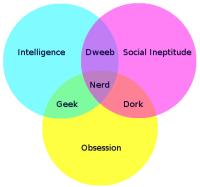
Why I’m A Geek and Not A Nerd, Dweeb, or Dork

Finally, a graph that explains it all perfectly:

I'm Not A Nerd

So you can call me geek, and I accept it as a compliment. But call me nerd, dork, or dweeb, and them’s fighting words.

If Architects Had To Work Like Web Designers

I’m About To Break Something

I’m finally getting around to moving this site up to Movable Type 4. I’ve been sitting on a Movable Type 3 install for a couple years, and there’s a lot of great plugins and features in Movable Type 4 that I’d like to incorporate on this site and its templates. But I can’t do anything until I get that base code in place.

I have a lot off code-level hacks done to my MT 3 install that I’ll need to make sure aren’t going to break when I upgrade. Hopefully it won’t. Unlike Jeff, I don’t have Anil helping me out — I’m going to try to wing it myself (but if you’re reading this, Anil, you’ve seen me on ProNet — I might need your help if I break something).

So tonight I’m hoping to upgrade to MT 4. If this site goes wonky and commenting doesn’t work, you’ll know why (but since MT is awesome and builds static pages, the pages will still be available). I’ll update this post accordingly when things work again.

Update at 10PM: Just in time for Top Chef, it appears the upgrade has gone through OK. Feel little oddball issues here and there, but it appears I’ve fixed 99% of them. If you notice anything weird, comment below or email utterlyboring [at] gmail [dot] com.

Windows 7 Taskbar vs. Mac OS X Dock

I missed this article when it first came out, but here’s a great comparison between the two, what works, what doesn’t as well as the differences and similarities between the UIs.

And The Google Voice Invite Goes To…

On Thursday, I had an extra Google Voice invite to giveaway. I put the entries into Excel, created a column full of random numbers, sorted by those random number (which changed the random numbers, which is why the screenshot ordering is a bit weird) and then had Random.org give me a random number. As you can see below, Shanlee was the winner!

(more…)